You could have the most beautifully designed campus, the most compassionate care staff, and a five-star dining program—but if families can’t find your community when they search online, you are effectively invisible.
In today’s digital-first landscape, dominating the physical neighborhood isn’t enough; you have to dominate the digital neighborhood. That’s exactly where a strong local SEO assisted living strategy comes into play.
The “Invisible Community” Problem
When adult children or seniors begin looking for housing options, they rarely start by typing in a specific facility’s name. They start with a generic, localized search. If your community isn’t appearing in Google’s “Local 3-Pack” (the top three map results displayed at the very top of the search page), you are missing out on the highest-intent traffic available. According to local search data from industry leaders like Moz, the vast majority of clicks go to those top three map listings. If you aren’t there, your competitors are capturing your move-ins.
The Emotional Search
Searching for senior living is fundamentally different from searching for a local coffee shop. Families typing “assisted living near me” into Google are often operating under high stress, urgency, or emotional weight. They aren’t just looking for a service; they are looking for peace of mind, safety, and a new home for someone they love.
Because of this emotional weight, your local search presence needs to convey immediate trust. Being the first result they see—backed by glowing reviews and accurate information—positions your community as the reliable, guiding hand they need in a difficult moment.
What This Playbook Covers
This guide isn’t about vague marketing theories. It is a tactical, step-by-step playbook designed specifically for senior living marketing teams and executive directors. We will cover:
- Dominating Google Maps: How to optimize your Google Business Profile to capture local searchers.
- Mastering Resident Reviews: A system for generating and responding to feedback that builds instant trust.
- Closing the Loop with CRM: How to track local leads, automate your review requests, and prove your ROI using the industry’s best CRM.
I. Google Business Profile (GBP): Your Digital Front Door
When a family is actively searching for care, your Google Business Profile (GBP) is often the very first interaction they have with your brand—even before they click through to your website. It is the digital equivalent of your community’s front porch. If it looks abandoned or confusing, they will keep driving.
Here is how to ensure your profile is fully optimized to capture that high-intent traffic.
Verification is Just Step One
Many management teams believe that once a profile has the blue “Verified” checkmark, the job is done. But verification is merely the starting line. According to local search experts, a fully completed profile is a major ranking factor.
Moving beyond “claimed” status means filling out every single available field:
- Operating Hours: Including specific visiting hours or tour availability.
- Business Description: A clear, compassionate description of your community that naturally incorporates your target keywords (without stuffing them).
- Attributes: Highlighting key differentiators like “Wheelchair Accessible,” “On-Site Dining,” or “Memory Care.”
An incomplete profile not only hurts your local rankings but also signals to anxious families that your community might lack attention to detail.
Category Logic: Getting Specific
Choosing the right primary category is one of the most critical decisions in your GBP setup. Google’s algorithm places immense weight on this choice.
Often, marketers will select broad categories or use “Retirement Community” and “Assisted Living Facility” interchangeably. However, these represent two entirely different search intents:
- Retirement Community: Targets seniors looking for 55+ independent living, lifestyle amenities, and a low-maintenance home.
- Assisted Living Facility: Targets adult children or seniors actively seeking help with Activities of Daily Living (ADLs) and a higher level of medical or personal care.
If you offer assisted living, “Assisted Living Facility” must be your primary category. The categories you select affect your local ranking on Google. If you offer multiple levels of care, use the secondary categories (or the “Services” tab) to highlight them, rather than diluting your primary focus.
Visual Storytelling: The New Standard
Families want to visualize their loved ones thriving in your space. Relying on sterile architectural shots or, worse, stock photography, will instantly break trust.
The standard includes:
- High-Resolution Interior & Exterior Tours: Let families virtually walk through your dining rooms, courtyards, and model apartments.
- Life at the Community: Authenticity wins. Post high-quality images of residents enjoying activities, chef-prepared meals, and compassionate interactions with your staff.
- 360° Views: Immersive media keeps users on your profile longer, which sends a positive engagement signal to Google.
Pro Tip: Google’s algorithm favors fresh content. Regularly uploading new “Owner Photos”—at least once a month—keeps your profile active and prevents user-uploaded photos (which you can’t control) from dominating your visual feed. At DIGITAL&, we constantly remind our partners that an updated photo gallery is one of the easiest ways to outrank a stagnant competitor.
GBP Updates: Signaling Active Engagement
Your GBP is not a static billboard; it is an active social feed. Using the “Updates” (formerly Posts) feature is an excellent way to signal to Google that your community is alive and engaging with the public.
Make it a habit to post every week or two. Use this space for:
- Event Announcements: Promoting upcoming Open Houses, family support group meetings, or holiday events.
- Helpful Resources: Sharing links to your blog (e.g., “How to Talk to Your Parents About Assisted Living”).
- Community Milestones: Celebrating a staff member’s work anniversary or a resident’s 100th birthday (with proper HIPAA-compliant releases, of course).
By keeping your digital front door fresh, welcoming, and highly specific, you lay the groundwork for a senior living local SEO strategy that actually converts.
II. The “Reviews Playbook”: Building Trust and Rank
In the senior living industry, your online reputation is your marketing currency. When families are narrowing down their list of facilities to tour, they aren’t just looking at amenities—they are obsessively reading reviews to ensure their loved one will be safe and happy.
But reviews do more than just build trust; they are the engine driving your local seo assisted living visibility.
Reviews as a Ranking Signal
Google’s algorithm relies heavily on reviews to determine which communities deserve to be in the highly coveted Local 3-Pack. In fact, Google’s own official guidelines explicitly state that a strong review count and positive rating directly factor into your local search prominence. Based on these foundational search engine principles, your online reputation impacts your local seo assisted living visibility through four key factors:
- Quantity: The total number of reviews your community has compared to the other facilities in your immediate area.
- Velocity: How consistently you receive new reviews. Earning 10 reviews in one week and zero for the rest of the year looks unnatural to Google’s algorithm. A steady stream (e.g., 2-4 a month) signals an active, thriving community.
- Recency: Families—and search algorithms—heavily discount feedback that is over six months old. A recent review proves that your current standard of care is excellent.
- Quality & Keywords: When families naturally mention specific phrases in their reviews (e.g., “amazing memory care staff” or “best assisted living in [City]”), Google indexes those keywords, giving your profile a massive relevance boost for those exact search terms.
The “Ask” Strategy: Timing is Everything
The biggest mistake communities make is waiting until an annual family survey to ask for reviews. By then, the initial relief and gratitude have faded into baseline expectations.
The Honeymoon Phase (30-60 Days Post-Move-In): The optimal time to ask for a review is roughly 30 to 60 days after a resident moves in. At this point, the family has transitioned from the high stress of the move to the immense relief of seeing their loved one settled, safe, and engaged.
Your care staff, dining servers, and activities directors interact with families the most. Train them to identify “happy moments.” When a daughter says, “I haven’t seen my dad smile like this in months,” that is the exact moment a staff member should say:
“That means the world to us. If you have two minutes, sharing that on our Google profile helps other families who are going through the stressful search process right now.”
Responding with Empathy (and HIPAA Compliance)
Responding to both 5-star and 1-star reviews shows families that management is attentive. However, senior living communities walk a tightrope that traditional businesses do not: HIPAA and resident privacy.
Even if a family member posts a detailed review naming their loved one and their medical conditions, you cannot legally confirm that information in your response. Acknowledging a resident’s presence in your facility is a direct HIPAA violation.
The Golden Rules for Compliant Responses:
- Never confirm the relationship: Avoid phrases like, “We are so happy Mary is loving the food!” or “We loved having your dad here.”
- Speak to general policies and values: Use the response to highlight your community’s standards to future readers.
- Move the conversation offline: Especially for negative reviews, acknowledge the feedback generally and provide a phone number.
Compliant Examples:
- Responding to a 5-Star Review: “Thank you for your kind words. Our entire team strives to provide a supportive, engaging, and compassionate environment for all seniors in our community. We truly appreciate you taking the time to share this feedback!”
- Responding to a 1-Star Review: “We take all feedback seriously and are committed to the highest standards of care and communication. Due to privacy regulations, we cannot discuss specific details online, but we deeply value the opportunity to resolve any concerns. Please reach out to our Executive Director directly at [Phone Number].”
III. On-Page Local Signals for Communities
While your Google Business Profile acts as your digital front door, your actual website is the foundation of your entire digital presence. Google’s algorithm constantly cross-references the information on your GBP with the information on your website to verify that your community is legitimate and trustworthy.
If those two properties are telling different stories, your local assisted living strategy will fall apart.
The NAP Consistency Audit
NAP stands for Name, Address, and Phone number. In the world of local SEO, NAP consistency is essentially “entity verification.” Google doesn’t just read text; it reconciles your business’s identity across the internet.
If your community is listed as “Oak Grove Senior Living” on Google, but your website footer says “Oak Grove Assisted Living & Memory Care,” and your Facebook page lists a different tracking phone number than your local chamber of commerce directory—you have a NAP consistency problem.
Inconsistent NAP data confuses search engines, dilutes your local authority, and ultimately breaks trust.
- The Fix: Conduct a comprehensive audit of your website’s footer, contact page, social media profiles, and major directories (like Yelp, Bing Places, and the Better Business Bureau). Ensure that your Name, Address (including suite numbers), and Phone number are formatted identically across the web.
Hyper-Local Content: Beyond “About Us”
Most senior living websites have standard pages: Amenities, Floor Plans, Dining, and Contact. But to truly capture local search traffic, you need content that proves your deep connection to the specific city you operate in.
- Neighborhood Guides: Families aren’t just moving their loved ones into a building; they are moving them into a neighborhood. Create hyper-local content like a “Seniors’ Guide to [City Name]” or “The Best Accessible Parks for Seniors in [City Name].” * Optimized Headings: Naturally weave local landmarks, county names, and your target city into your H1 and H2 tags. Instead of a generic heading like “Assisted Living Services,” use “Compassionate Assisted Living in [City Name].” This explicitly tells Google exactly where you are and who you serve.
Schema Markup: Speaking Google’s Language
Schema markup (or structured data) is invisible code added to the backend of your website. It translates your site’s content into a language that search engines can easily categorize. According to the guidelines at Schema.org, this is one of the most powerful tools for local businesses.
For senior living communities, implementing the right schema can pull rich snippets—like star ratings, operating hours, or FAQs—directly into the search results page, drastically increasing your click-through rate.
- LocalBusiness Schema: Do not just use generic “Organization” schema. You must implement LocalBusiness schema on your location pages. This hardcodes your exact coordinates, business hours, and NAP data so Google never has to guess where you are located.
- FAQ Schema: Families searching for senior care have a million questions (e.g., “Do you accept Medicaid?” or “What is the staff-to-resident ratio?”). By implementing FAQ schema on your pricing or care pages, you can dominate the search results real estate by having your specific answers display directly on Google page one.
IV. Connecting the Map to the Lead: The CRM Integration
You can rank #1 in the Local 3-Pack, generate hundreds of profile views, and secure dozens of 5-star reviews—but if you cannot prove that those efforts are translating into actual tours and move-ins, your management company will not see the value.
This is where the strategy shifts from visibility to attribution. To truly master local seo assisted living marketing, you must bridge the gap between your Google Business Profile (GBP) and your CRM.
Here is how to connect your map presence directly to your lead pipeline.
Tracking the Source: The GBP “Website” Button
By default, when a family clicks the “Website” button on your Google Business Profile, Google Analytics and HubSpot will often lump that traffic into a generic “Organic Search” bucket. This makes it impossible to distinguish between someone who found your homepage via a traditional search versus someone who clicked through your localized map listing.
The Fix: Tracking URLs
You need to create a specific tracking URL (UTM parameter) exclusively for your GBP button. In HubSpot, navigate to the Tracking URL Builder and create a link formatted like this: yourwebsite.com/?utm_source=google&utm_medium=organic&utm_campaign=gbp_listing
When you paste this customized link into the “Website” field of your GBP, your CRM will automatically categorize those specific visitors. Now, you can run a report in HubSpot to see exactly how many leads, tours, and eventual move-ins originated specifically from your Google Maps presence.
Automating Feedback Loops
As discussed in Section II, timing your review requests is crucial. Relying on busy Executive Directors or care staff to remember to email families manually is a recipe for missed opportunities.
Instead, you can use HubSpot Workflows to automate the “Ask.”
- The Trigger: Set up a HubSpot workflow triggered by a specific deal stage change, such as “Tour Completed – Positive” or a contact property like “Resident Move-In Date + 45 Days.”
- The Action: HubSpot automatically sends a personalized, plain-text email from the Executive Director.
HubSpot “Review Request” Email Template: Subject: Checking in on [Resident Name] / A quick question
Hi [First Name], I wanted to personally check in and see how your family is settling in since the move. It has been a joy having [Resident First Name] in our community! If you have a moment, would you mind sharing your experience with a quick Google review? [Insert Link] > Families in your exact position rely heavily on reviews from people like you when making this difficult decision. Your insight truly helps. Warmly, [Executive Director Name]
Centralizing Communications: Messages and Calls
Google Business Profiles now feature direct “Chat/Message” buttons, and families are using them. If a daughter messages your profile at 8:00 PM asking about memory care availability, and nobody checks the GBP dashboard for three days, that lead is gone.
By utilizing integration tools to connect your Google Business Profile with your CRM, you can map GBP “Messages” in your shared inbox. This ensures that every local inquiry is immediately logged as a contact in your CRM, assigned to a sales counselor, and placed into a follow-up sequence so nothing falls through the cracks.
V. Advanced Tactics: AIO & Voice Search
Nowadays, families are no longer just typing fragmented keywords into a search bar; they are having conversational dialogues with AI assistants, and Google is synthesizing complex answers on the fly.
To future-proof your community’s visibility, you need to optimize for both voice inputs and AI-generated search results.
Voice Search Optimization: Writing for the Ear
Voice search is no longer a separate, experimental channel—it is a primary input method. When a stressed daughter is driving home from visiting her father, she isn’t typing. She is asking Siri or Google Assistant, “What is the highest-rated memory care facility near me?” or “How much does assisted living cost in [City]?”
Voice queries are inherently conversational, long-tail, and question-based. To capture this traffic, your content must match natural speech patterns.
- The 40-Word Rule: Voice assistants pull their spoken answers directly from “Position Zero” (Featured Snippets). To win this spot, structure your content strategically: use an H2 or H3 tag to ask a specific question, and immediately follow it with a clear, direct answer that is roughly 40 to 50 words long.
- Conversational FAQs: Move away from corporate jargon. Create robust FAQ pages that mirror the exact “Who, What, Where, When, and How” questions families actually ask during tours.
- Speakable Schema: Work with your web developer (or an agency like DIGITAL&) to implement Speakable schema markup. This code specifically highlights the parts of your site that are most appropriate for an AI assistant to read aloud to a user.
AIO (AI Overviews) Ready: The Zero-Click Reality
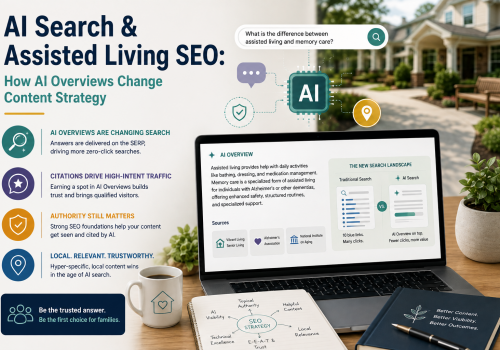
Google’s AI Overviews (AIO) have fundamentally changed the local search landscape. Google is now embedding the Local 3-Pack directly inside AI-generated summaries. Instead of just showing a map, the AI actively reads your reviews, scans your website, and cross-references local directories to write a custom summary of your community.
This has led to the rise of Zero-Click Searches—meaning families get all the information they need from the AI Overview without ever clicking your website link.
While a drop in website clicks might sound alarming to your management company, it is actually an evolution of search intent. Here is how to ensure your community is the one Google’s AI recommends:
- Review Consensus is Everything: AI Overviews summarize the overall sentiment of your reviews. If multiple families mention your “compassionate memory care staff” or “beautiful courtyard,” the AI will literally cite those phrases as facts when users search for those amenities.
- Third-Party Citations: AI search engines rely on third-party sources to verify brand authority. Your presence on local community boards, directories (like SeniorAdvisor), and local news sites feeds the AI’s understanding of your community’s trustworthiness.
- Quality Over Quantity: Because AI answers preliminary questions directly on the search page, the traffic that does click through to your website is much closer to making a decision. When these hyper-qualified leads finally submit a form and enter your CRM, you will likely notice a significantly shorter sales cycle and a higher tour-to-move-in conversion rate.
Conclusion
The “Invisible Community” problem is entirely solvable, but it requires a shift in mindset.
Consistency Wins
Mastering local seo for assisted living is not a project you can check off a list and forget about. It is a living, breathing ecosystem. Your Google Business Profile needs fresh photos monthly, your review strategy requires weekly attention, and your NAP data must remain flawlessly consistent across the ever-changing web. It is a continuous commitment to your digital reputation.
The Competitive Edge
The senior living market is hyper-competitive, but the communities that master Google Maps, embrace conversational AI, and track their full-funnel data will own the local market share of tomorrow. By executing the plays outlined in this guide, you ensure that when a family in your area raises their hand for help, your community is the first, most trusted option they see.
At DIGITAL&, we help you build this infrastructure so you can focus on what you do best: caring for your residents. Schedule a FREE Discovery Call with DIGITAL& today.
FAQ
How can a senior living community rank higher on Google Maps?
To rank higher on Google Maps and enter the coveted “Local 3-Pack,” communities must fully optimize their Google Business Profile. This goes beyond basic verification and includes selecting precise primary categories (like “Assisted Living Facility”), maintaining strict NAP (Name, Address, Phone) consistency across the web, and signaling active engagement by posting fresh photos and community updates monthly.
What is the best strategy to get more positive reviews for an assisted living facility?
The most effective strategy is timing the request during the 30-60 day “Honeymoon Phase” after a resident moves in. During this window, families transition from high stress to relief. Training staff to request a review during happy moments, or automating personalized plain-text emails through a CRM, ensures a steady velocity of recent, high-quality reviews.
How should healthcare and senior living facilities respond to negative online reviews?
Communities must respond with empathy while strictly adhering to HIPAA regulations. Never confirm the relationship or acknowledge the resident’s presence in the facility. Instead, speak to general community standards, acknowledge the feedback broadly, and provide a phone number to move the conversation offline and directly to the Executive Director.
How do you track leads coming from local SEO and Google Maps?
o prevent Google Maps traffic from blending into generic “Organic Search” data, create a specific tracking URL (UTM parameter) for the “Website” button on your Google Business Profile. By integrating this localized data with a CRM, you can accurately track exactly how many tours and move-ins originated directly from your local map presence.
How can senior housing communities optimize for voice search and AI overviews?
To capture voice and AI-driven queries, adopt the “40-Word Rule” by asking a specific question in an H2 or H3 tag followed by a concise 40-50 word answer. Additionally, implement Speakable and FAQ schema markup, and build brand authority through consistent reviews. Partnering with a specialized agency like DIGITAL& can help build this infrastructure to adapt to the Zero-Click search reality.